
- What the Lenme app is
- Two sides of the app: borrowers and investors
- How borrowing works inside the app
- What the Lenme app costs
- iOS vs Android: are they the same?
- Other Lenme products you'll see in the app
- When the app makes sense — and when it doesn't
- Lenme app quick facts
- Lenme app walkthrough, screen by screen
- Permissions and data the app requests
- Investor side of the app (so you understand who's judging you)
- Lenme app vs. the lenme.com website
- Common app problems and fixes
- FAQ
What the Lenme app is
Lenme — sometimes written LendMe or Lenmo in older listings — is a mobile peer-to-peer (P2P) lending platform founded by Mark Maurice and headquartered in Seattle, Washington. The company went through the Techstars accelerator and today describes itself as an 'AI-powered lending and borrowing' marketplace. The core idea is simple: instead of a bank deciding whether you get a loan, your request is shown to individual investors and lending businesses who compete to fund it.
The app is available as Lenme: Borrowing and Lending on the Apple App Store (bundle ID com.lenmoinc.lenmo, version 26.x as of late 2026) and on Google Play. It is free to download, but as explained below, using it to borrow is not free.
Two sides of the app: borrowers and investors
Borrowers
Request $50–$5,000 or a $200 instant cash advance. Set your amount and payback period, verify identity, link a bank, and wait for offers.
Investors (lenders)
Fund requests at your own rate (Lenme says lenders can offer from 3% APR), review borrower risk data, or use Automated Lending to set criteria and let the system fund for you.
Lenme Inc.
Operates the marketplace, verifies users, runs 'Lenme Predict' risk scoring, and handles payments and collections. It is not itself the lender.
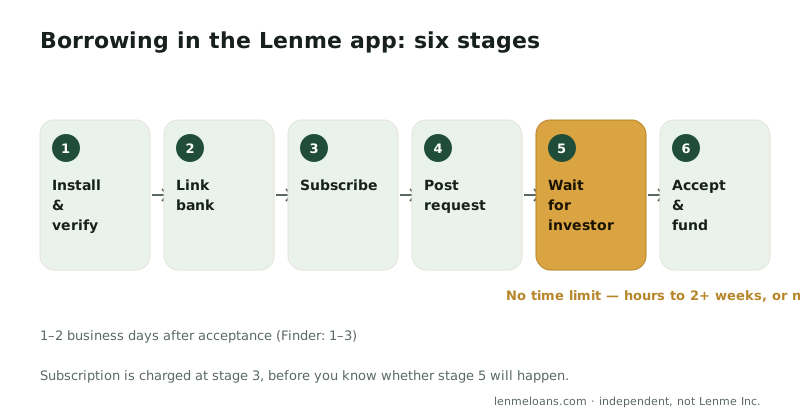
How borrowing works inside the app
- Download and create an account. You'll be asked for personal details and to verify your identity.
- Link your primary bank account. Lenme reviews banking history (reviewers describe about 90 days of transactions) as part of the risk profile investors see.
- Post a loan request. Choose an amount and repayment period. Lenme says this takes under five minutes and does not involve a hard credit inquiry.
- Wait for offers. Investors see your request and risk profile and may send offers with their rate. The in-app 'feed' shows which loans are being funded and at what rates.
- Accept an offer. Review the rate and term, then accept. Lenme states funds typically arrive in 1–2 business days.
- Repay through the app. Payments are automatically collected from your linked bank account on the agreed schedule.
Step 4 has no deadline. A request can sit without offers and eventually expire. Reddit users in r/cashadvanceapps describe spending two weeks on verification and still not being funded, and app-store reviewers mention waiting more than a week. If your need is time-sensitive, treat Lenme as one option, not the only one.
What the Lenme app costs
| Cost | Details | Source |
|---|---|---|
| Subscription | Monthly and annual plans sold as in-app purchases (Apple Pay / Google Play billing) | App Store listing |
| Interest | Set by the investor whose offer you accept; lenders may offer from 3% APR based on your profile | App Store listing |
| Origination fee | Up to 1.00% of the loan amount | SuperMoney |
| Prepayment | Prepayment fees reported | SuperMoney |
| Loan terms | Short — maximum of 12 months | SuperMoney |
| Our request form | Free; lender-set APR and fees shown before you sign | lenmeloans.com |
For a worked example of what a $1,000 Lenme loan might cost including the subscription, see our fees & rates breakdown.
iOS vs Android: are they the same?
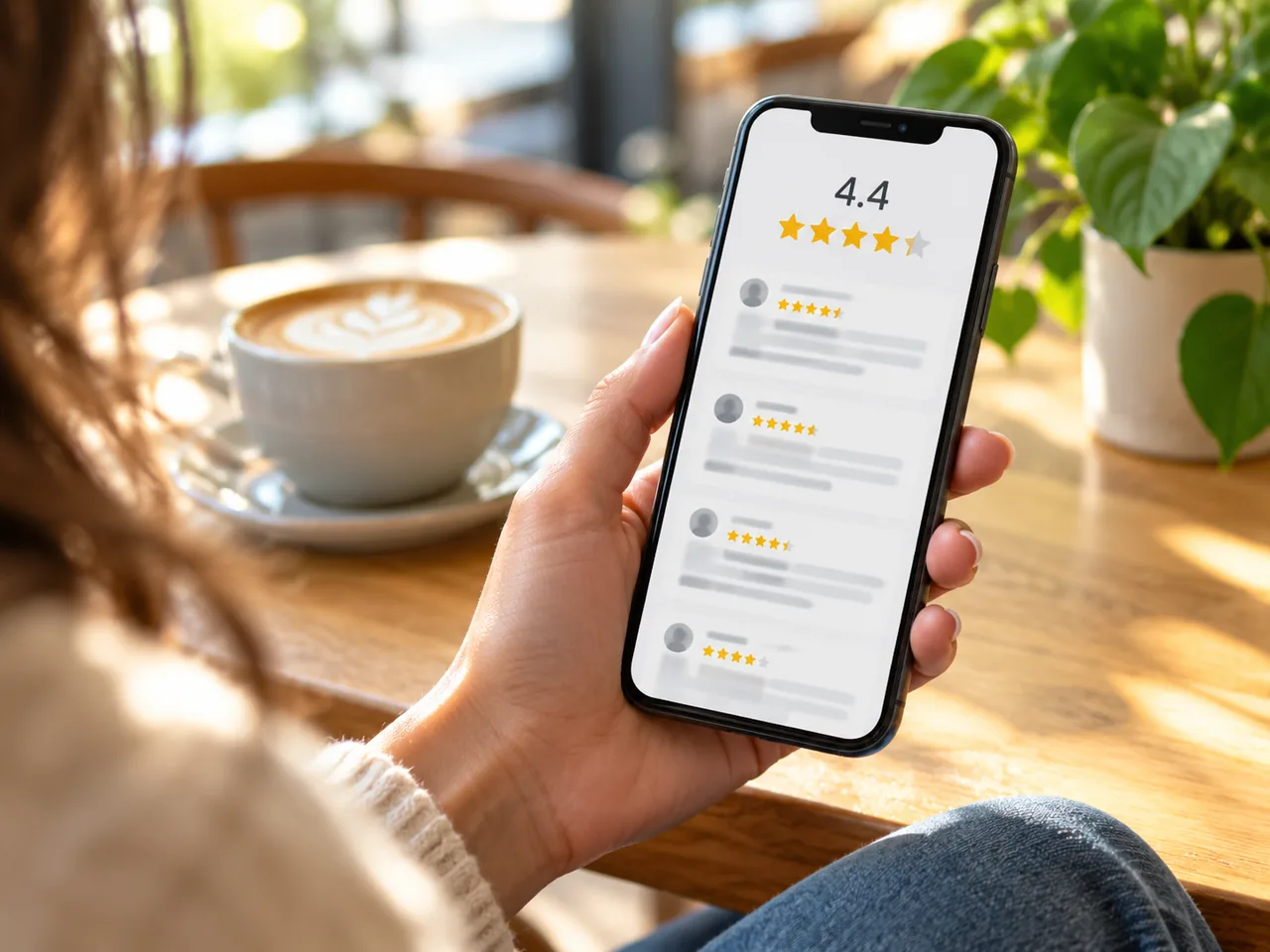
Mostly, but not entirely. The Google Play description notes that loans shown in the feed reflect loans funded through the platform, 'some of which may not be available to Android users.' Both versions request precise location permission and notification permission. The iOS listing is rated 4.4 out of 5 at the time of writing; independent app-quality trackers such as unitQ flag recurring complaints about requests going unfunded.
Other Lenme products you'll see in the app
- $200 instant cash advance — a no-credit-check advance for eligible users, with a 'set a balance limit' overdraft-protection feature.
- Crypto-backed loans — connect a crypto wallet as collateral to request up to $10,000.
- Lenme Predict — a machine-learning score shown to investors to estimate repayment likelihood.
- Automated Lending — investors set criteria and the platform funds matching requests automatically.
- Lenme Enterprise — white-label lending infrastructure sold to businesses (not relevant to individual borrowers).
When the app makes sense — and when it doesn't
The Lenme app is a reasonable choice if you have a few days to spare, a stable banking history, and you want investors to compete for your loan. It is a poor fit if you need money this week, if you'd rather not pay a subscription before seeing an offer, or if you don't want to install an app and link accounts just to find out whether anyone will fund you.
That second group is who our service is for. The request form on this page is independent of Lenme, works in any browser, is free, and sends your request to a network of third-party lenders that respond in minutes. If you get an offer you don't like, you simply decline.
Don't want to wait on investors?
Submit one request to our lender network. Free, no app, no subscription.
Lenme app quick facts
| Item | Detail |
|---|---|
| Developer | Lenme Inc., Seattle, WA |
| Founder | Mark Maurice |
| Platforms | iOS (App Store), Android (Google Play) |
| Loan range | $50–$5,000; $200 cash advance; $10,000 crypto-backed |
| Credit check to request | No hard inquiry |
| Cost | Subscription + investor-set interest + fees |
| Support | [email protected] · (844) 426-6606 · help.lenme.com |
| Official site | lenme.com |
Lenme app walkthrough, screen by screen
The following is what you'll see after installing, based on the current App Store build (26.x) and Lenme's help-center articles. Screens change with updates, but the sequence has been stable since the crypto-backed product launched.
- Welcome & phone verification. Enter a U.S. mobile number and confirm a one-time code. This number becomes your login, so use one you'll keep.
- Profile. Legal name, date of birth, home address, and Social Security number. Finder's review confirms the SSN is required — Lenme uses it for identity verification and to pull the credit snapshot investors see.
- Bank linking. Choose your primary checking account through the in-app bank connection. Lenme reads transaction history; reviewers consistently describe roughly 90 days being evaluated.
- Subscription. Pick a monthly or annual plan. Billing is handled by Apple or Google, which is why refund and cancellation requests go to the store, not to Lenme.
- Borrow tab. Set the amount and repayment period and submit the request. The app shows a Lenme Predict-based profile that investors will see.
- Offers & feed. Offers arrive as notifications. The 'feed' tab lists funded loans and rates so you can price your request to match the market.
- Accept, fund, repay. Accept one offer; funds arrive in 1–2 business days (Finder cites one to three); repayments auto-debit on schedule.
Permissions and data the app requests
| Permission / data | Why Lenme asks | Can you decline? |
|---|---|---|
| Precise location | Fraud screening and state-eligibility checks (listed in Android permissions) | Possibly, but verification may fail |
| Notifications | Offer alerts — critical, since offers can expire | Yes, but you'll miss offers |
| Bank account access | Risk profile for investors; deposits and auto-debit | No — required to borrow |
| SSN and government ID | Identity verification and credit snapshot | No — required to borrow |
| Crypto wallet | Collateral for $10,000 crypto-backed loans | Yes — optional product |
Independent scans are reassuring on the security side: Appaloosa Scout reports no known CVEs and a high privacy score for the current iOS build, and NowSecure lists the Android app in its directory without flagged risks. The privacy concern is less about leaks and more about how much you hand over before you know whether anyone will fund you.
Investor side of the app (so you understand who's judging you)
Lenme Invest gives lenders a dashboard of open requests with each borrower's Predict score, credit band, income-to-expense picture, and Lenme history. Investors can fund manually or set Automated Lending rules — for example, 'fund requests under $500 with a score above X at 20% or more.' Lenme says there are no investment minimums or withdrawal fees, and it handles collections. The practical implication for you: automated rules fund the typical borrower fast, while anything unusual — a new account, irregular income, a large first request — waits for a human who may never come.
Lenme app vs. the lenme.com website
lenme.com is marketing and support only: product pages (Lenme Borrow, Lenme Invest, Lenme Enterprise), a blog, a news page, contact details, and a help center at help.lenme.com. There is no web dashboard for borrowers or investors. If a website asks you to 'log in to Lenme' in a browser, it is not Lenme — see our login help page.
Common app problems and fixes
| Problem | What usually causes it | Fix |
|---|---|---|
| Request posted, zero offers | Profile outside most investors' filters, or rate below the feed | Lower amount, raise rate, wait 60–90 days of clean banking, or run a parallel lender-network request |
| Stuck on verification | ID photo glare, name mismatch with bank, VOIP phone number | Retake ID in daylight; use the exact legal name; use a carrier number |
| Charged but can't borrow | Subscription active, request unfunded | Request a refund via Apple/Google; email [email protected] |
| Offer expired before accepting | Notifications off | Enable notifications; check the app daily while a request is live |
| Can't see loans in feed (Android) | Some loans unavailable to Android per Google Play listing | Normal; not a bug |
The Lenme app is well built and safe to use. Its weakness is structural, not technical: you pay a subscription and surrender full verification before you learn whether anyone will lend to you. If that trade-off doesn't suit you, our browser-based request on this page is the no-subscription, answer-in-minutes alternative.
Frequently asked questions
Is the Lenme app free?
The app is free to download, but borrowing requires a monthly or annual subscription purchased in-app, and loans carry investor-set interest plus an origination fee of up to 1%.
Is Lenme available on Android?
Yes. Lenme is on Google Play as 'Lenme: Borrowing and Lending.' The listing notes that some loans visible in the feed may not be available to Android users.
Does the Lenme app check your credit?
Posting a request does not trigger a hard credit inquiry. Investors do see a risk profile that draws on credit, banking, and income data.
What is the Lenme feed?
The feed is an in-app tab showing which loan requests are being funded and at what interest rate, intended to keep the marketplace transparent and competitive.
Can I get a Lenme loan without the app?
No — Lenme is app-only. If you prefer a browser-based request with no download or subscription, use the independent loan request form on this page.
Does the Lenme app require my Social Security number?
Yes. Finder's review and Lenme's verification flow confirm the SSN is required for identity verification and the credit snapshot shown to investors.
Does Lenme report to credit bureaus?
Finder lists 'can't build credit' as a con, indicating Lenme loans generally do not report positive payment history. Check your specific loan agreement.
Why does Lenme want my location?
The Android listing shows precise-location permission, used for fraud screening and state eligibility. Declining may cause verification to fail.
Sources
Facts on this page were checked against the following sources on 2026-10-27. Links open in a new tab.
- Lenme: Borrowing and Lending — Apple App Store listing
- Lenme: Borrowing and Lending — Google Play listing
- Lenme official website
- Lenme news — Automated Lending launch
- Lenme Enterprise
- SuperMoney — Lenme Loan Reviews (2026)
- Finder — Lenme peer-to-peer lender review (updated Dec 2025)
- unitQ — Lenme quality scorecard
- Appaloosa Scout — Lenme iOS privacy & security scan
- NowSecure MARC — Lenme Android app directory entry
- Dealroom — LendMe (Lenme) company profile